Meet Photon#
Welcome to Photon Documentation!
This documentation provides an overview of Photon concepts, workflows, and system behavior.
Photon is an AI-powered test management and execution platform that helps teams create, organize, execute, and maintain manual and automated tests. AI assists with test generation, normalization, and maintenance, while users remain in full control of test definitions, execution, and results.
Photon supports both manual and AI-driven testing workflows, allowing teams to manage the complete testing lifecycle from test design to execution and reporting.
This guide introduces core concepts, explains how tests are created and executed, and provides instructions for working with the platform.
What is Photon#
Product Overview#
Photon is a test management and execution platform with built-in AI capabilities.
The platform provides the following capabilities:
- Records test steps and converts them into executable cases
- Executes AI-driven test scenarios without handwritten automation scripts
- Generates cases by observing application behavior
- Helps keep tests up to date as the application structure or UI evolves
- Consolidates execution results from manual tests, AI-driven scenarios, and automated tests from frameworks including JUnit, TestNG, pytest, and others
- Supports highly scalable parallel test execution
- Identifies potential regressions and unexpected behavior
Photon is designed to complement existing testing practices rather than replace them. It integrates naturally into workflows that include unit, integration, and end-to-end testing, as well as practices such as Test-Driven Development (TDD).
Together, these capabilities enable teams to shift testing left, detect regressions earlier, reduce test maintenance effort, and accelerate software delivery.
AI-Powered Test Management and Execution Platform#
Photon uses AI across multiple stages of the testing lifecycle, including:
- Test scenario and step generation
- Execution without predefined scripts
- Updating tests after application changes
- Validation adjustments to reduce false positives
These capabilities reduce the need for manual scripting and test maintenance. Test design and validation logic remain under user control.
Differences from Traditional Automation Tools#
Photon differs from script-based automation in several areas:
| Traditional Automation Tools | Photon |
|---|---|
| Require programming and test scripts | Tests can be created using natural language with AI support |
| High maintenance after UI changes | Tests can adjust to UI and structural changes |
| Typically maintained by engineers | Accessible to QA, product, and other roles |
| Scaling requires infrastructure setup | Execution across environments is built in |
| Manual updates required for test suites | Test updates supported by AI |
Photon can be used to replace parts of manual regression testing and reduce reliance on script-based automation.
Intended Users#
Photon is used by cross-functional teams, including:
- QA Engineers – working with regression testing, exploratory testing, and validation logic
- QA Leads / Test Managers – defining testing strategy and monitoring coverage
- Product Teams – validating critical user flows during development
The platform supports shared access to test artifacts and execution results.
1.2 Core Use Cases#
Replacing Manual Regression Testing#
Photon can be used to automate regression testing by generating and executing tests based on application behavior.
Tests can be executed across releases, enabling regular validation of existing functionality.
Expanding Test Coverage#
Test coverage can be extended without manually creating large numbers of cases.
The system:
- Observes user flows
- Identifies frequently used paths
- Generates reusable scenarios
Learn more about how AI-driven test generation can dramatically accelerate test creation in the article Test Generation with AI: From Zero Tests to MVP in a Day.
Reducing Test Maintenance Cost#
Changes in UI or application structure can affect existing tests. Photon updates test behavior based on detected changes.
This reduces:
- Manual updates to cases
- Frequency of broken tests
- Time spent stabilizing test suites
Collaborative QA Workflows#
Photon provides shared access to:
- Cases
- Execution results
- Detected failures
This supports coordination between QA and development.
1.3 Documentation Conventions#
Terminology & Core Concepts#
This documentation uses consistent terminology for platform entities and workflows.
Key terms are introduced where needed and described in relevant sections.
Test Flow#
A Test Flow is a sequence of interactions and validations representing a user journey.
Test flows:
- Are derived from observed application behavior
- Represent end-to-end scenarios
- Serve as a basis for generated cases
- Can adjust to UI or flow changes
Application Under Test (AUT)#
The Application Under Test (AUT) is the system being tested.
Photon:
- Analyzes application structure and behavior
- Tracks interaction patterns and UI changes
- Uses execution data for validation
- Detects deviations during execution
Credit#
A Credit is a usage unit for platform operations.
Credits are consumed during:
- Test recording execution
- Test generation and updates
- Recovery during execution
- Analysis and failure investigation
Dashboard#
A Dashboard displays testing-related data, such as:
- Test coverage
- Execution results
- Failure trends
Dashboards aggregate and visualize execution data.
Environment#
An Environment defines the context in which tests are executed (e.g., development, staging, production).
Environments are used to:
- Compare results across deployments
- Account for environment-specific behavior and UI differences
- Configure execution settings
Separate sensitive data (such as credentials) from test logic
Execution Session#
An Execution Session is a continuous interaction period between the system and the application.
During a session:
- Application behavior is observed
- Interaction and execution data are collected
- Execution logic is applied
- Context is recorded for analysis
A session may include multiple test executions.
Issue#
An Issue represents incorrect or unexpected behavior detected during execution.
Photon:
- Identifies failures
- Groups similar issues
- Provides execution context
- Suggests possible causes or corrective actions
- Supports linking issues to external issue-tracking systems
Known Issue#
A Known Issue is a failure associated with an existing unresolved defect.
Marking known issues:
- Reduces repeated alerts
- Distinguishes new failures from existing ones
Milestone#
A Milestone represents a defined testing phase, such as a release or iteration checkpoint.
Milestones are used to:
- Group execution results
- Track changes over time
- Compare testing outcomes between phases
Project#
A Project is the main organizational unit.
Each project:
- Represents a single application
- Stores cases and execution data
- Maintains its own context for analysis
Regression Run#
A Regression Run validates that existing functionality remains stable after changes.
The system:
- Selects relevant cases
- Prioritizes execution based on changes
- Orders execution steps
Case#
A Case is a validation scenario.
In Photon:
- Cases may be generated or modified by AI
- They describe intent rather than fixed steps
- They can adjust to application changes
Users can review and edit all cases.
Test Execution#
A Test Execution is a run of one or more cases.
Each execution:
- Runs within the platform
- Produces logs, results, and metadata
- Includes failure detection and analysis
Run#
A Run is a configured execution of selected cases.
It may include:
- Test selection and ordering
- Execution behavior
- Result aggregation
Runs can be linked to environments, milestones, or versions.
Widget#
A Widget is a visual element within a dashboard (e.g., chart or table).
Widgets display:
- Trends
- Execution data
- Failure summaries
Icons and Callouts#
The documentation uses visual indicators:
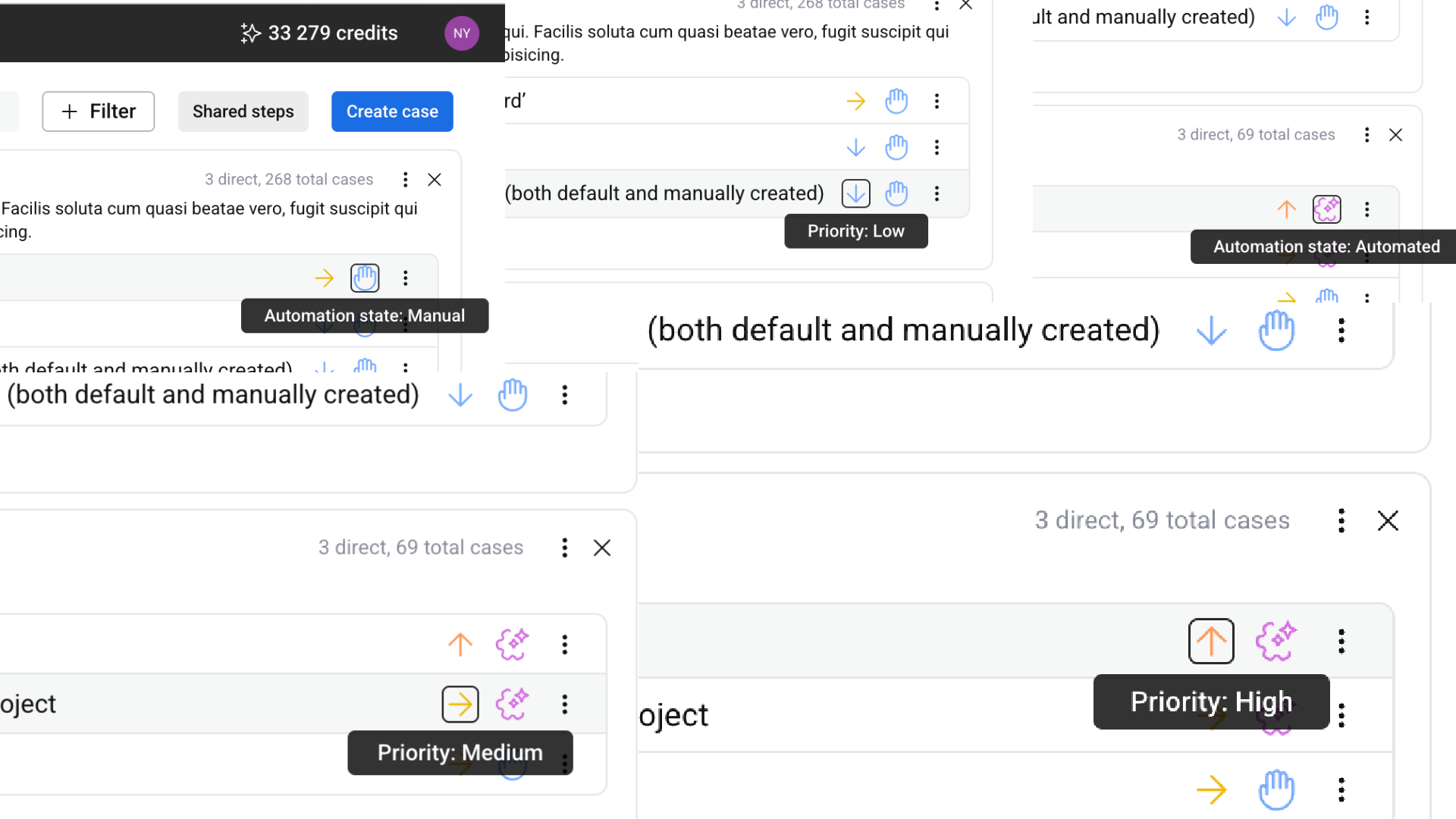
- Automation State: [Manual / Automated / Recorded / To be automated / Planned ]
- Priority: [Low / Medium / High / Critical]
Versioning and Updates#
Photon is updated regularly.
Documentation reflects:
- Changes in functionality
- Updates to workflows
- Interface changes
Version-specific differences are indicated where relevant.